
CATEYE PADRONE SMART +
Usage Instructions

General
Device
The following section explains how to pair a smart computer with a sensor or a DI2 system and how to configure various settings.
Important
• Device settings are shared when smart computer is connected to your smartphone.
• Third party sensor pairing information cannot be synchronized.
When measuring in Sensor Direct Mode, it is necessary to configure sensor settings separately via smart computer.
 1. Switching to Sensor Direct Mode
Smartphone
1. Tap  (Other) and then [Device].
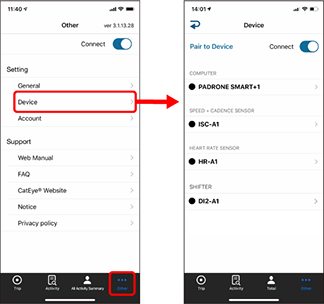
Changing smart computer settings
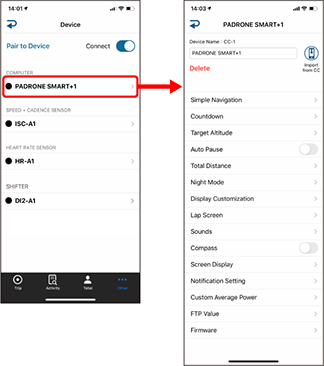
• Device Name
Changes the name of the smart computer.•
 (Import from CC) Sensor Direct Mode measurement only
Displayed when summary data exists on the smart computer connected to the smartphone.• Delete
Tapping this will delete the displayed device.• Simple Navigation Mirror Mode measurement only
Designates a goal in simple navigation.• Countdown Mirror Mode measurement only
Sets a distance or a time as a goal.• Target Altitude Mirror Mode measurement only
Sets an altitude as a goal.• Auto Pause Mirror Mode measurement only
This function automatically pauses measurement when the connection between smart computer and your smartphone is interrupted if you move away from the bicycle with your smartphone during measurement.• Total Distance
Lets you manually set total distance traveled.* Use this function when you want to continue from the same distance after purchasing a new smart computer or when resetting smart computer.
• Night Mode
Configures when to start and end backlight illumination, and duration of illumination in seconds.
When Night Mode is ON, pressing any button on the smart computer during the specified time will turn the backlight on.* When automatic display illumination is ON, the start and end of illumination time will be adjusted automatically depending on the season.
• Display Customization
Lets you select the measurement screens to add or delete in addition to the screen segments and functions (measurement data) to be displayed on each screen.
Changing the measurement screen• Lap Screen Mirror Mode measurement only
Lets you show or hide lap screens, and select screen segments and lap data to be displayed.
Changing the lap screen* The lap screen will be displayed if the SS/LAP button is pressed from the measurement screen during measurement, or if auto lap is ON.
• Sounds
Lets you turn the operation sounds, alert sounds, and notification sounds on or off.• Compass Mirror Mode measurement only
Lets you select whether to show or hide the compass on the measurement screen.• Screen Display
Lets you select between [Abbreviated] or [Full] for displaying measurement data names on the measurement screen.(Ex.) Abbreviated display for trip distance: DST
Full display for trip distance: Distance• Notification Setting Mirror Mode measurement only
Configure the settings for incoming phone calls and email notifications and for smartphone remaining battery notification.Important
• Email notifications valid only with the email addresses registered with [Add Account].
• When an incoming notification is received, the display will not show the app name or the name of the sender.
Configuring Incoming Notifications• Custom Average Power
Sets the number of seconds for calculating average power to your preferences.• In Mirror Mode: Specify the number of seconds. (1 to 300 seconds)
• In Sensor Direct Mode: Select a value from 3, 5, 10, and 60.
* Custom average power measurements require pairing with a power sensor.
• FTP Value
You can set the value that will be the calculation reference for TSS and IF measurements.• Update Firmware
Updates the smart computer firmware to the most recent version.
Changing sensor settings
Important
These settings can be configured even when your smartphone is not connected to smart computer.
If settings differ between devices, they will be overwritten with data from Cateye Cycling™ the next time the devices are connected.
* Information related to third party sensors paired with the smart computer remains unchanged.
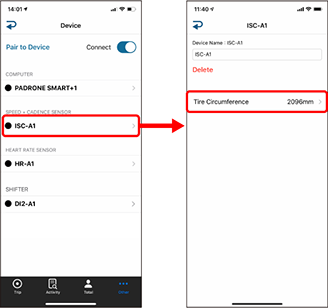
• Device Name
Changes the name of the sensor.* Paired sensors are displayed with "A" or "C" after the sensor name.
A : Sensor paired with Cateye Cycling™
C: Sensor paired with a smart computer• Delete
Tapping this will delete the displayed device.• Tire Circumference
Set the tire circumference for a sensor capable of speed measurement.
Scroll to find the tire size indicated on the sidewall of the tire. Tap and hold to choose the tire size.
Accurately finding the tire circumference* Default value: 2096 mm (700x23C)
* Requires to set tire circumference for each sensor.
Changing DI2 system settings
Important
• These settings can be configured even when your smartphone is not connected to smart computer
• If settings changed for the DI2 are not applied to the smart computer, or if the smart computer does not operate properly, format the smart computer.
See “Abnormal display: General” under “Frequently Asked Questions” for details..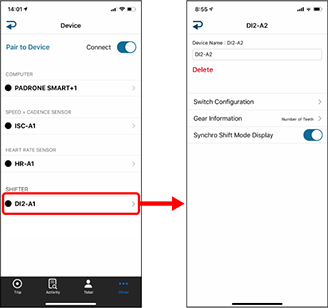
• Device Name
Changes the name of the DI2.• Delete
Tapping this will delete the displayed device.• Switch Link
Uses the DI2 system switch to operate a smart computer.• Gear Information
Select [Number of Teeth] or [Gear Ratio] for the gear information displayed on the measurement screen.• Synchro Shift Mode Display
You can display the synchro mode on the measurement screen.* When you turn on synchro shift mode, the incoming notification icon is not displayed.
* See the following for pairing with a smart computer, a sensor or a DI2 system.
Pairing a smart computer with a smartphone
Pairing a sensor or a Shimano DI2 system with the Cateye Cycling™ app
Account